Key Use Case
Intro Videos allow you to add your own personal touch with a pre-recorded message to be displayed to candidates before they begin their interview. You can have one or multiple recordings and can specify which video should be used per Project.
Key References to Intro Videos
- Purpose: They are used to engage candidates and provide context before they start the formal assessment process.
- Templates: Organisations can manage multiple videos within the Intro Videos templates section. These templates allow users to save and reuse high-quality video introductions across different projects.
- Project Integration: On the project's Intro Video tab, a user can switch the intro video on and choose a specific video from their existing templates to display for that particular vacancy.
- Candidate Journey: The intro video is positioned at the very start of the process to set the tone for the candidate's experience.
Management and Access
- Visibility: The ability to view, create, or manage these templates is restricted to users with the relevant Templates permissions.
- In use: A project uses the video from your library rather than a separate copy. A video that is in use in an active project cannot be deleted.
To access the Intro Videos Library click on Templates > Intro Videos in the left hand side menu.
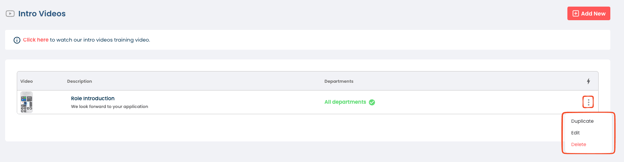
- You can upload as many Intro Videos as you like to your Intro Videos Library.
- To add an Intro Video click on the “Add New” Button.
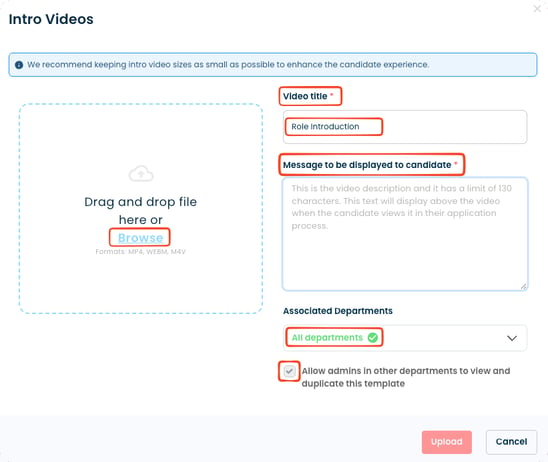
- The accepted formats for Intro Videos are MP4, WEBM and M4V, up to 1GB per video.
- We recommend keeping Intro Video sizes as small as possible to enhance the candidate experience.
- You will be able to select an Intro Video to upload, specify a Video Title as well as draft a message that will be displayed to the candidate.
- You can choose which Departments the Intro Video is related to as well as if you want to allow users in other departments to view and duplicate the template for the Intro Video.