Accessing Your TalentIndex Assessment & Profile Setup
Congratulations on moving forward in your application! As part of our selection process, you are required to complete the TalentIndex Assessment and set up your candidate profile. This guide will walk you through accessing the correct link and ensuring a smooth completion.
Step 1: Locating the Correct Invitation Email
The link you need is delivered directly to your inbox. It is crucial to find the specific email, as it contains your unique access credentials.- Sender: The email will typically come from “Talentindex Online Assessment clientservice.nl@assessio.com”.
- Subject Line: “Invitation to participate in the Talentindex Online Assessment”
Quick Tip: Check your Spam/Junk folder if you don't see the email in your primary inbox that you applied to the vacancy with.
Sender: The email will typically come from “Talentindex Online Assessment clientservice.nl@assessio.com”.
Subject Line: “Invitation to participate in the Talentindex Online Assessment”
Step 2: Accessing Your Profile & Assessment
Once you have located the email, follow these instructions to begin:- Click the Unique Link: Inside the invitation email, you will find a unique hyperlink. This link is personalized for you and will take you directly to the TalentIndex platform to set up your profile.
- DO NOT search for the general TalentIndex website or log in via a public portal. Always use the link in your email.
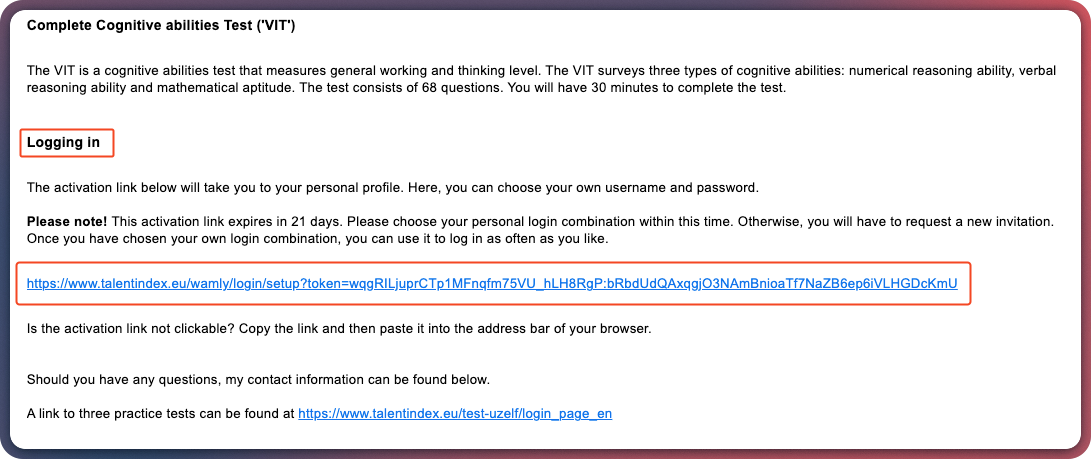
- Login Credentials:
- Ensure you use your email address with lowercase letters as your username.
- Create a memorable password that complies with the requirements in the below image.
- Once all the ticks are green, click on the Next button:
This will allow you to access your TalentIndex assessments made up of three parts:
- Motivations Test
- Personality Measurement
- Cognitive ViT Assessment (Timed assessment with 30 minutes, this cannot be paused).
Click the Unique Link: Inside the invitation email, you will find a unique hyperlink. This link is personalized for you and will take you directly to the TalentIndex platform to set up your profile.
- DO NOT search for the general TalentIndex website or log in via a public portal. Always use the link in your email.
Login Credentials:
- Ensure you use your email address with lowercase letters as your username.
- Create a memorable password that complies with the requirements in the below image.
- Once all the ticks are green, click on the Next button:
Motivations Test
Personality Measurement
Cognitive ViT Assessment (Timed assessment with 30 minutes, this cannot be paused).