
This release focuses on giving you more control over how job requests move through your organisation. Introducing the new Job Request & Approval Engine, an all-in-one hiring solution that takes the chasing and guesswork out of sign-offs. We’ve also shipped a batch of security hardening, sharper permissions controls, and general improvements to keep things running smoothly behind the scenes.
New Feature: Introducing Job Requests and Approvals
We’ve all watched job requests vanish into email black holes, held hostage by decentralised, clunky sign-off procedures. Wamly’s new Job Request and Approval Engine completely eliminates this chaos by automating the entire sign-off journey directly within your existing Wamly workflow. Simply configure your rules once, and Wamly handles the rest, automatically routing requests, blocking unauthorised steps, and logging every single approval to give you one automated engine, a foolproof audit trail, and a single source of truth.
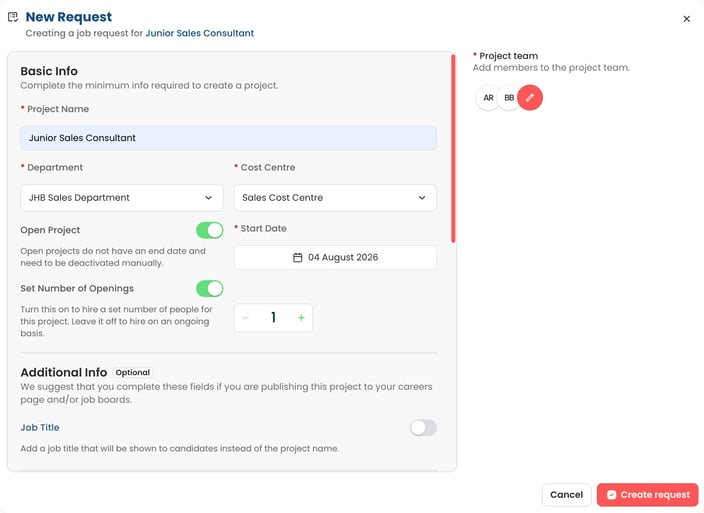
Authorised users can submit detailed job requests directly within Wamly with just four essentials: Project Name, Department, Cost Centre and Number of Openings. Everything else, from the job overview and business justification to location, compensation and classification, forms the full Project Specification and can be completed as needed. They can then add their project team, including relevant line managers, HR officers and other collaborators, so everyone responsible for the project is looped in from day one.
While basic job requests are available to all Professional Plan users, the real magic happens with our Enterprise-exclusive Approval Engine (Essential Plan users do not have access to this feature).
For professional accounts, the job request tool acts as the "first page" of a draft project, leaving HR to drive the actual approval process manually using traditional methods outside of Wamly.
With the Enterprise Approval Engine, that manual chasing disappears entirely. Once an admin configures your conditional workflows, the system takes over. The moment a request is submitted, approvals are triggered automatically based on your custom rules. HR can take that coffee break while approvers review and sign off anytime, anywhere, directly from their email without ever needing to log into Wamly.
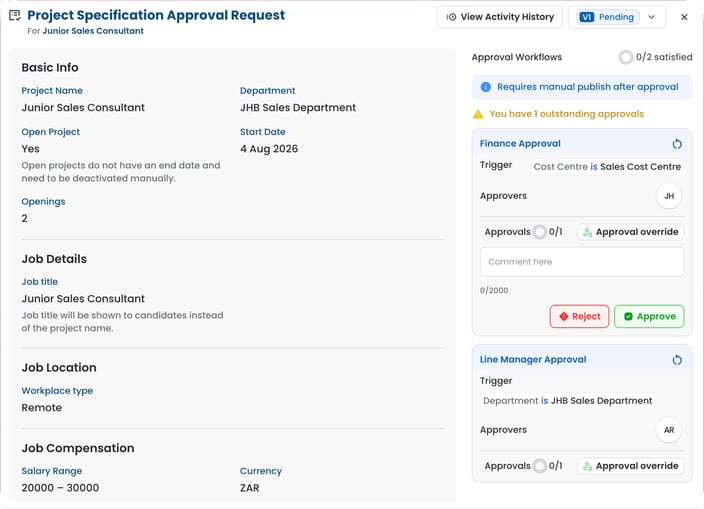
For a detailed overview of how Job Requests and Approvals works, read the full guide here.
Bug Fixes & Other Improvements
This release also ships with several bug fixes and improvements.
Security Fixes
- Prevented OTP spamming by enforcing server-side cooldowns and request caps on OTP generation.
- Added a mechanism to block registration from known disposable or temporary email domains to improve account accountability.
Permissions & Access Control
- Department admins now only see roles and departments they are actually permitted to assign in the user management pickers.
- New Feature: Added a separate permission key for the "Usage" section in Billing & Usage, allowing visibility into seat counts without exposing financial balances.
- Fixed an issue where users could view and duplicate templates from departments they didn’t have permission for.
- Removed the legacy "allow other departments to duplicate" toggle from templates, moving access control into the new permission system.
- Created a dedicated permission key for viewing candidate reports.
- Introduced dedicated permission keys for the Intro Video tab, separating it from general project settings.
- Fixed an issue where the system would default to the most restrictive stage visibility instead of using the highest-scope access granted to a user.
- Added filters for role management, allowing admins to filter roles by level, management type, and hidden status.
- Extended "permission explainability" to templates, helping users understand exactly why a specific template action is blocked.
General Improvements & Fixes
- Fixed the "Rate all" navigation from the dashboard so it correctly applies the "Most Recent" sort order on the applications page.
- Fixed a duplication issue in project member search where users with multiple roles appeared as multiple rows.
- Added filtering for user groups by member and assigned role to support infinite scrolling and correct totals.
- Implemented salary masking on candidate-facing surfaces (like career pages) when the visibility toggle is set to hidden.
- Restored missing job location data in the candidate project details API.
- Fixed a layout issue in the projects table where the context menu would render off-screen if a project link was present.
Happy Hiring!
The Wamly Product Team